Assigning an OPCIS Point to an OPCIS Group
By default, all points in the OPCIS are included in a group named OPCDEFAULTGROUP. You can associate a point with a custom group.
To Assign an OPCIS Point to an OPCIS Group
- Using CygNet Explorer, click on the Point Service (PNT) in the service hierarchy.
- Select the OPCIS point to associate with an OPC group.
- On the Point reference page, CygNet point reference section:
- Set the Point reference Type to OPC Group Facility.
- Use the Choose facility button to select the name of the Facility ID of the OPC Group Facility.
- Click OK.
|
Associating an OPCIS Point with a custom OPCIS Group OPC30SEC |
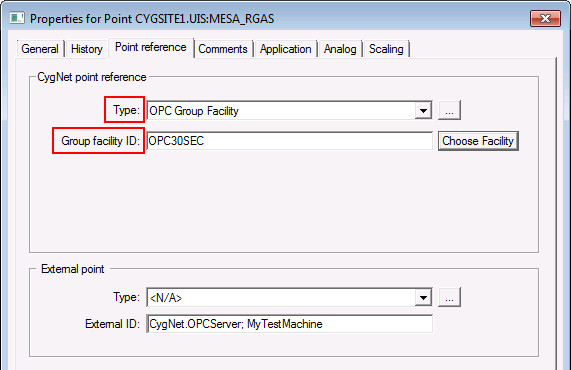
Note: If the Type or Group facility ID field is left blank the point will be associated with the Default OPC Group (OPCDEFAULTGROUP). If you specify an OPC Group Facility for which a Group Definition point does not exist, the OPCIS will use the Default Group update rate.

